
Grandstream GXP 2000 VoIP settings & configuration Guide
The Grandstream GXP-2000 IP Phone is an award-winning next generation IP network telephone based on industry open standards. Built upon innovative technology, Grandstream IP Phone features market leading superb sound quality and rich functionalities at ultra-affordable price.
STEP 1
You must first determine what IP address it received. To do this, press the round menu button, then the down arrow next to it until the display shows:
[2] IP Addr
Now, press the round menu button again and you will be shown the IP address of your device (e.g. 192.168.0.100).
STEP 2
Go to any browser equipped computer on your network and enter the address: http://<IP ADDRESS>/
<IP ADDRESS> is replaced by the address that was given to you in STEP 1.
STEP 3
You will be prompted to enter a password, the default is "admin", then click the "Login" button.
STEP 4
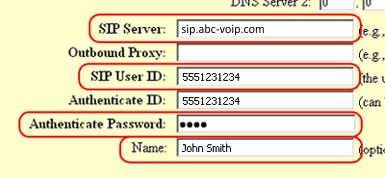
Go to ACCOUNT 1 tab. You need to modify only a few parameters from the factory default. They are listed here:
SIP Server: sip.ABC-VoIP.com
SIP User ID: Enter the account number assigned to you when signed up for ABC-VoIP service.
Authenticate ID:Enter the account number assigned to you when signed up for ABC-VoIP service.
Authenticate Password: Enter the password that you chose when you signed up for the service.
Name: Enter your full name, this will show up as part of your caller ID.
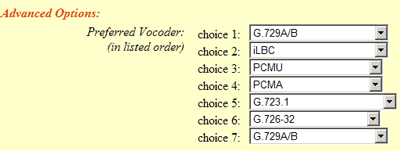
Advanced Options choice 1: Change preferred Vocoder to G.729A/B
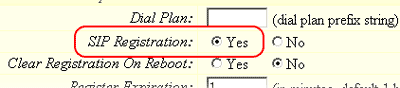
SIP Registration: Yes
NAT Traversal: No

STEP 5
Click on the "Update" button at the bottom of the form.
STEP 6
Go to ADVANCED SETTINGS tab.Click on the "Update" button at the bottom of the form.
STEP 7
Click on the "Update" button at the bottom of the form.
STEP 8
You will be brought to a confirmation screen on which you will click on the only option available: "Click to view your changes".
STEP 9
Click on the "Reboot" button at the bottom of the form.

STEP 10
Make Calls!
Problems?
If you get one-way audio, or cannot get a dial tone or cannot make/receive calls with your VoIP device, you are probably behind firewall. Your router's firewall (also known as NAT) is blocking certain operations of the VoIP telephone adapter or some of the settings of the adapter is not entered correctly.